A desktop client for Postgres
Bring order to Postgres.
Every value exactly as the server sent it. Every change shown as SQL before it runs. Free and open source.
v0.1 public beta · macOS (Apple silicon) and Linux
- Postgres 14 to 18Each release is tested against every supported version.
- Signed and notarizedCheck the file you downloaded with one command.How to verify ↓
- No telemetryYour data goes to your database. One update check, and that's the list.
- Open source, MPL-2.0Free for commercial work.Read the source ↗
Read every value as it really is.
A table tree, tabs and a grid. Everything else appears only while it is in use.
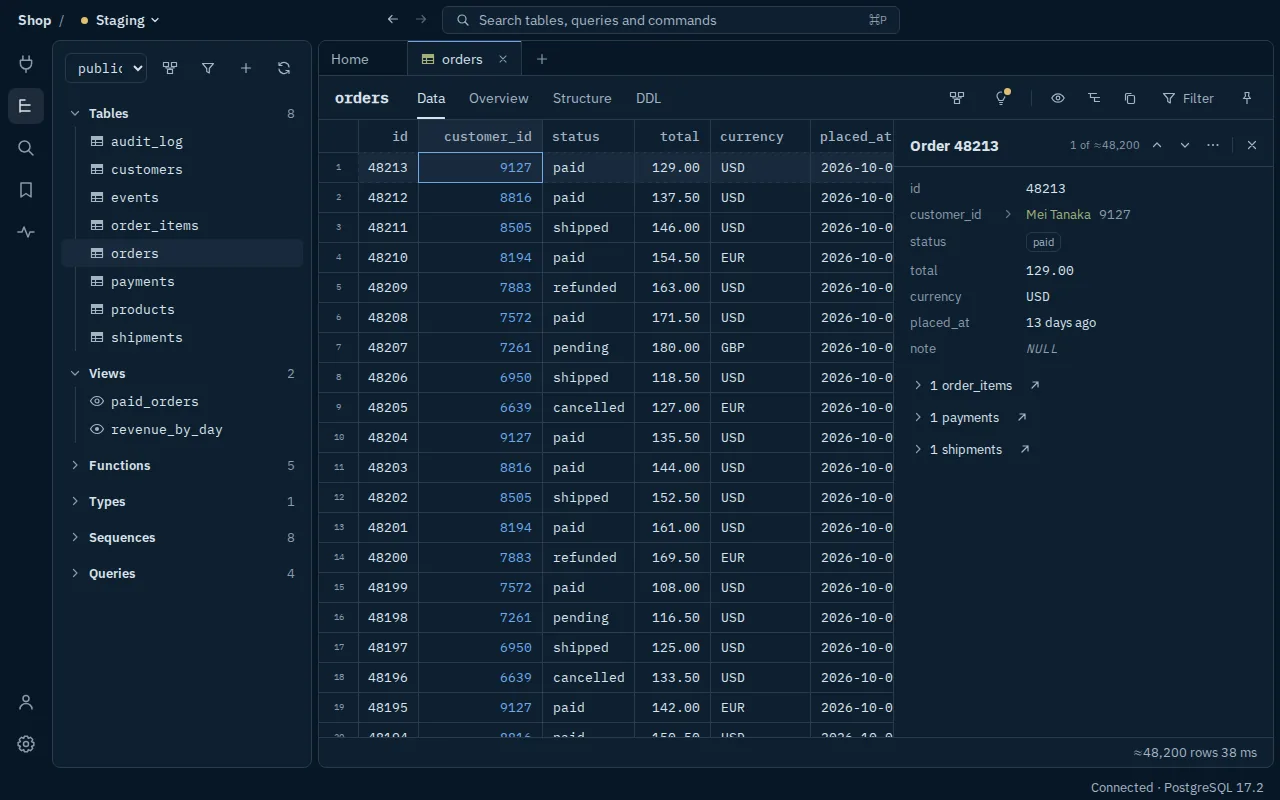
- NULL is never blank.It's set apart from an empty string. Timestamps keep their zone; big numbers are never rounded.
- Foreign keys, both ways.Open a row and its related rows are listed beneath it, a click away in either direction.
- The environment is always named.Staging, here, in the top bar of the whole window. Production looks different at a glance.
- One shortcut to anything.⌘P reaches any table, saved query or command.
Write SQL with the server reading over your shoulder.
SELECT o.currency,
       sum(o.totl) AS revenue,
       count(*) AS orders
  FROM orders o
 WHERE o.status = 'paid'
   AND o.placed_at >= now() - interval '30 days'
 GROUP BY 1
 ORDER BY revenue DESC;
ERROR: column o.totl does not exist
HINT: Perhaps you meant to reference the column "o.total".
- Errors where they happenedPlaced at the exact position, in the server's own words, with its hint.
- Completion that knows your schemaFollows aliases, CTEs and the search path, knows foreign-key joins, and is checked by the planner.
- Nothing is ever lostEvery tab is saved as you type, untitled ones too. History keeps everything you ran.
- Cancel anythingEvery running query shows its time and stops when you ask.
Read before you write.
Edits to rows and structure are marked and wait until you've reviewed and approved the statements they will become. Staged edits are saved locally, so even a crash keeps them.
BEGIN;

UPDATE public.orders
   SET status = 'refunded'
 WHERE id = 48209;

ALTER TABLE public.orders
  ADD COLUMN refunded_at timestamptz;
-- no default, so no table rewrite

COMMIT;
- Notes on riskStructure changes come with notes on locks and rewrites, and a safer form where one exists.
- Saved as a migrationKeep any review as a migration file in your project's own format.
- Checkpoints you can restoreTake one before a risky change on a dev database, and put it back if it goes wrong.
- Try it yourselfStage an edit, read its SQL, then see what production does.Open the interactive review →
Each database knows where it lives.
Every connection is marked local, development, staging or production, and that sets how careful Alcuin is.
- Local & devAsks first before a drop, a truncate, or an update or delete with no
WHERE.Edits stage and review as everywhere. - StagingAsks first before all of the above, and anything whose effect can't be read from its text.Named in the top bar.
- ProductionAsks first before any structure change.Opens read-only. Stops statements after 30 s and lock waits after 3 s. Locks again 15 minutes after you unlock it.
Settings can make any environment stricter; production's rules are a floor. For a guarantee that doesn't rest on the app, connect production with a role that can only read.
A new app is asking for your database password. Fair to be wary.
So here is exactly what Alcuin does with it, and how to prove the app you downloaded is the one we built.
Passwords stay in your system keychain. They never reach the window, the local state file, logs or copied URLs.
Your data goes to your database. That's the list. Apart from an update check against GitHub Releases, nothing leaves your machine unless you turn it on.
AI is optional, and off. Bring your own key or a local model. It sees your schema, not your rows, and the SQL it suggests never runs by itself.
Every release lists what's inside. A CycloneDX SBOM with each dependency and the Electron, Chromium and Node versions it ships.
# Was this file built by Alcuin's release workflow?
gh attestation verify Alcuin-0.1.0-arm64.dmg --owner alcuin-app# Is the installed app notarized by Apple?
spctl -a -vv /Applications/Alcuin.appA passing result names the workflow, commit and repository that built the file. How verification works
Questions
Is it really free?
Yes. Alcuin is open source under MPL-2.0, including for commercial work. If you distribute a changed version, your changes to Alcuin's own files are published under the same licence.
Will it work with my hosted Postgres?
Postgres 14 to 18, wherever it runs: directly, over TLS, or through an SSH tunnel with host-key checks. Passwords can come from AWS, Azure, Cloud SQL or Vault through a command you approve once.
Can I bring my saved connections?
Yes. Import your connections from pgAdmin and DBeaver today, and from TablePlus and Postico as soon as either offers a plain export. Or paste a connection URL, and servers already running on your machine (Postgres.app, Homebrew, Docker) are listed, ready to open.
How stable is it?
Alcuin is in public beta. Every release is walked through the same checklist and tested against each supported Postgres version. Tell us what breaks in GitHub issues.